

Every account your household depends on, in a vault that never leaves your browser.
TwinVault is a local-first, browser-based vault that gives a household one organized view of every account, credential, subscription, and security risk — with all data kept in your browser, not on a server.
In active development. Core vault, account tracking, security scoring, attention queue, duplicate/breach detection, password-manager import, and an optional AI assistant are built. Data is stored in-browser via localStorage; there is no hosted backend database.
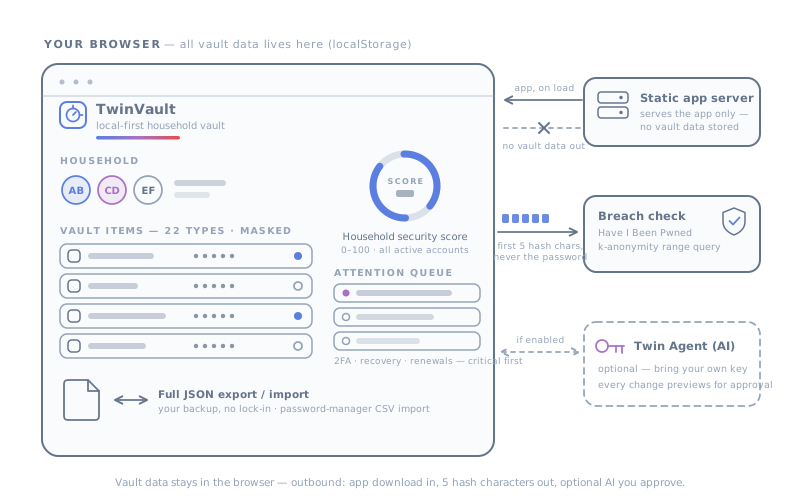
What you get.
- Local-first by design — your vault data lives in your browser's localStorage, not in a hosted database. The production server only serves the static app; it does not store your accounts.
- One household view — assign every account to a person, see who owns what, what it costs, and what needs attention, instead of scattering this across spreadsheets and memory.
- Security posture you can actually see — a household security score and an intelligent attention queue surface missing 2FA, weak or reused passwords, missing recovery info, and overdue reviews.
- Privacy-respecting breach checks — password breach detection uses the Have I Been Pwned k-anonymity API, sending only the first five characters of a password's SHA-1 hash, never the password itself.
- AI is optional and bring-your-own-key — the Twin Agent and AI-assisted import only run if you supply your own Google Gemini key, which is stored locally and used only for calls to Google's Gemini API.
- Every AI-proposed change is a preview you approve — Twin Agent actions are shown as pending and only take effect when you explicitly apply them; nothing is changed silently.
A full-vault JSON export, and no hosted database to trust.
Multi-person household management
Assign accounts and vault items to household members with roles (e.g. Primary, Co-Admin, Family), each with their own name and color, so ownership and responsibility are always clear.
Account & subscription tracking
Track each account's service, login identity, category, status, and billing — free/paid/trial, cost, billing cycle, and renewal date — to see what you're paying for and when it renews.
Per-account security tracking
Record 2FA status, password status, risk level, recovery method/email/phone, and the last review date for every account, plus flags for shared, critical, and emergency-contact access.
Household security score
A single 0–100 score aggregated across all active accounts, weighted by 2FA, password status, risk level, and recovery coverage, giving a quick read on overall posture.
Intelligent attention queue
Automatically surfaces accounts needing action — missing 2FA on finance/email/cloud accounts, missing recovery info on critical accounts, overdue reviews, approaching renewals, trials ending soon, paid-but-inactive, high risk, and domains expiring within 30 days — sorted critical-first.
Rich vault item library (22 types)
Store structured, templated items beyond logins: secure notes, credit cards, identities, passports, driver licenses, bank accounts, API credentials, SSH keys, crypto wallets, databases, medical records, software licenses, Wi-Fi routers, and more, with sensitive fields masked by default.
Duplicate & credential-health detection
Scans vault items for reused passwords, duplicate emails/usernames, identical credentials, similar entries, and weak passwords, grouped by severity, with a one-click fix flow to generate and apply stronger passwords.
Breach monitoring (k-anonymity)
Checks stored passwords against the Have I Been Pwned Pwned Passwords API using k-anonymity — only the first five hash characters leave the browser — and reports compromised credentials.
Password-manager import
Detects and parses CSV exports from Keeper, 1Password, Chrome, Dashlane, Bitwarden, LastPass, Firefox, Safari, NordPass, Notion, and generic formats, recording the import source on each item.
Twin Agent (optional AI assistant)
A Gemini-powered chat assistant that can add, update, search, and import vault items via natural language and uploaded files — every proposed action is shown as a preview you approve or reject before it's applied.
Credential version history
Vault items carry a current version and can archive previous credential versions with notes and a reason (e.g. password rotated, superseded by an import), so you retain history when secrets change.
Categorization with system + custom categories
Organize accounts into built-in system categories plus your own custom ones, each with an icon and color.
Full JSON import / export
Back up and restore your entire vault as a single JSON file, keeping you in control of your own data with no lock-in.
Keyboard shortcuts
Power-user shortcuts including ⌘K search, ⌘N new account, and ⌘? help for fast navigation.
Obsidian Vault dark theme
A warm dark 'Obsidian Vault' aesthetic with sage/amber/rose/slate status accents, a light-mode option, a collapsible sidebar, and mobile-optimized responsive layouts.
How it works.
- Open TwinVault in your browser — it runs as a single-page app and keeps all data in your browser's localStorage; in production the server only serves the static app, with no hosted database.
- Add the people in your household and assign accounts and vault items to them, capturing service, login, category, billing, and security details.
- Optionally import existing credentials from a password-manager CSV export (Keeper, 1Password, Bitwarden, LastPass, Chrome, and more), which records the source on each item.
- Review the household security score and attention queue to see exactly which accounts need 2FA, stronger passwords, recovery info, or an overdue review.
- Run duplicate and breach scans to find reused or weak passwords and credentials exposed in known breaches, then use the one-click fix flow to rotate them.
- Optionally connect your own Google Gemini key to use the Twin Agent for natural-language vault management and AI-assisted import — approving each proposed change before it applies.
- Export your vault to JSON anytime for a full local backup, and restore it the same way.
Questions, answered.
Where is my data stored? Is there a server?
Your vault data is stored locally in your browser using localStorage — there is no hosted backend database. In production the included Express server only serves the static single-page app; it does not receive or store your accounts. You can also export everything to a JSON file for your own backup.
Does TwinVault require AI, and what happens to my data if I use it?
AI features are entirely optional and bring-your-own-key. The Twin Agent and AI-assisted import only work if you provide your own Google Gemini API key, which is stored locally in your browser and used only for calls to Google's Gemini API. Without a key, the rest of the app works normally. Note that when you do use these features, the relevant item data is sent to Google's Gemini API to process your request.
How does breach checking protect my passwords?
Password breach checks use the Have I Been Pwned Pwned Passwords API with k-anonymity: TwinVault hashes the password with SHA-1 and sends only the first five characters of that hash, never the password or the full hash. It then checks the returned range locally to see if your password appears in known breaches.
Can I move my data in and out, or import from my current password manager?
Yes. TwinVault can detect and parse CSV exports from Keeper, 1Password, Chrome, Dashlane, Bitwarden, LastPass, Firefox, Safari, NordPass, Notion, and generic CSV formats, and it records the import source on each item. You can also import and export your entire vault as JSON at any time.
Is TwinVault encrypted, and is it a finished product?
Honest answer: based on the repository, data is persisted in plain localStorage in your browser and sensitive fields are masked in the UI, but we do not claim an at-rest encryption layer beyond your device and browser. TwinVault is in active development — the core vault, security scoring, attention queue, duplicate/breach detection, import, and optional AI assistant are built, and some areas are still evolving.
The other tools run the same way.
-
TwinMail
Run every inbox you're responsible for, without handing over a password.
-
TwinContacts
The contact app that actually keeps your network perfect.
-
TwinHermes
An always-on agent on a box you own.
-
TwinSystem
One repo for the whole smart home.
Nothing leaves the browser except five characters of a hash.
That is the entire network footprint of a breach check. The vault itself never leaves your machine.